
AR Overlays for Solo Livestreamers: The Complete Setup Guide for 2025
Key Takeaways
- 1
AR overlays transform a single-camera solo livestream into a multi-layer visual experience — without requiring a production crew or expensive hardware.
- 2
Choosing the right overlay software stack (OBS, Touch Designer, or browser-based tools) directly affects your stream's hook rate and how long first-time viewers stay past the 30-second mark.
- 3
Embedding live data panels — subscriber counts, poll results, chat sentiment — inside your AR overlay layer turns passive viewers into active participants and measurably lifts comment volume.
- 4
Keeping overlays minimal and purposeful outperforms cluttered designs: one strong visual element per scene beats five competing ones every time.
What Are AR Overlays and Why Do Solo Livestreamers Need Them?
An AR overlay — short for Augmented Reality overlay — is a layer of graphics, data, or animated elements placed on top of your live camera feed in real time. Unlike a static "Lower Third" nameplate, true AR overlays can track your face, respond to chat events, display live statistics, or react to sound. For a solo creator running a stream alone, they function as a silent production team: handling visual variety, audience interaction cues, and brand reinforcement simultaneously.
The practical impact shows up immediately in your hook rate — the percentage of viewers who stay past the first 30 seconds of a stream or video. A visually dynamic scene gives a new viewer a reason to pause rather than scroll. This is the same principle explored in Pattern Interrupt Hooks (2026 Edition): Stop the Scroll and Keep Viewers Watching. On a livestream, you cannot re-edit your opening — your overlay does that work for you in real time.
The Solo Streamer's Core Problem: Looking Professional With No Crew
A broadcast studio uses lighting directors, graphics operators, and a technical producer. A solo creator has one monitor, one camera, and one pair of hands. AR overlays close this gap by automating what a graphics operator would otherwise do manually — switching scene elements, surfacing relevant information, and creating visual rhythm across a stream that might run for two or three hours.
This is not about mimicking a television set. It is about giving your stream a visual grammar — a consistent set of cues that teach regular viewers what to expect and signal to new viewers that this is a professional, intentional production. That reputation compounds. Viewers who trust your production quality are more likely to subscribe, return, and comment — the three signals that matter most to the YouTube algorithm.
Software Options: Building Your AR Overlay Stack
OBS Studio with Browser Sources
OBS Studio remains the most widely used free streaming software. Its Browser Source feature renders live HTML/CSS/JavaScript directly inside your scene, which means any web-based overlay tool — StreamElements, Streamlabs, or custom-coded panels — displays as a live graphic layer. This approach is lightweight and stable, making it ideal if your machine handles both streaming and gaming simultaneously.
Touch Designer for Advanced AR
Touch Designer is a node-based visual programming environment used by live performance artists and broadcast studios. It enables true real-time 3D compositing, meaning you can place three-dimensional objects into your camera feed that appear to sit in physical space. The learning curve is steep, but the results are visually distinctive — a meaningful competitive advantage for a solo streamer in a crowded category. If you want your stream to look unlike anyone else in your niche, this is the tool.
Snap Camera and Similar Filter Layers
For face-tracked AR specifically — virtual backgrounds that respond to head movement, animated accessories that follow your face — Snap Camera and similar virtual camera applications sit between your physical webcam and OBS. They act as a software "virtual camera" that OBS reads as a normal input. Setup takes under fifteen minutes and requires no coding knowledge.
Browser-Based Overlay Builders
Platforms like Overlayer, Touch Portal, and Deckboard offer drag-and-drop overlay construction with built-in YouTube and Twitch API connections. These pull live subscriber counts, chat messages, and donation alerts directly into your graphic panels without any manual update. For a solo creator who cannot afford to take eyes off the camera to update a graphic, automation here is essential.
Designing Overlays That Help, Not Hurt
The most common mistake solo streamers make is treating the overlay canvas as advertising space. Cluttered streams — with donation bars, follower goals, social handles, countdown timers, and animated alerts all active simultaneously — create visual noise that competes with the creator for attention. The viewer's eye does not know where to look, so it stops looking entirely.
A useful design principle: one primary graphic element per scene. Your talking-head scene might have a Lower Third with your name and a subtle animated border. Your screen-share scene might have a small webcam bubble and a live chat panel. Your Q&A scene might surface one poll result at a time, centered on screen. Each scene has a clear visual hierarchy. This connects directly to the broader framework in 3 YouTube Metrics That Actually Matter (And 2 That Are Just Vanity) — clarity of intent in your visual design reflects clarity of intent in your content strategy.
Live Data Panels: Turning Your Stream Into a Two-Way Experience
The most powerful use of AR overlays for solo streamers is not decoration — it is data. Embedding live metrics directly into your stream frame transforms what viewers see and changes how they behave.
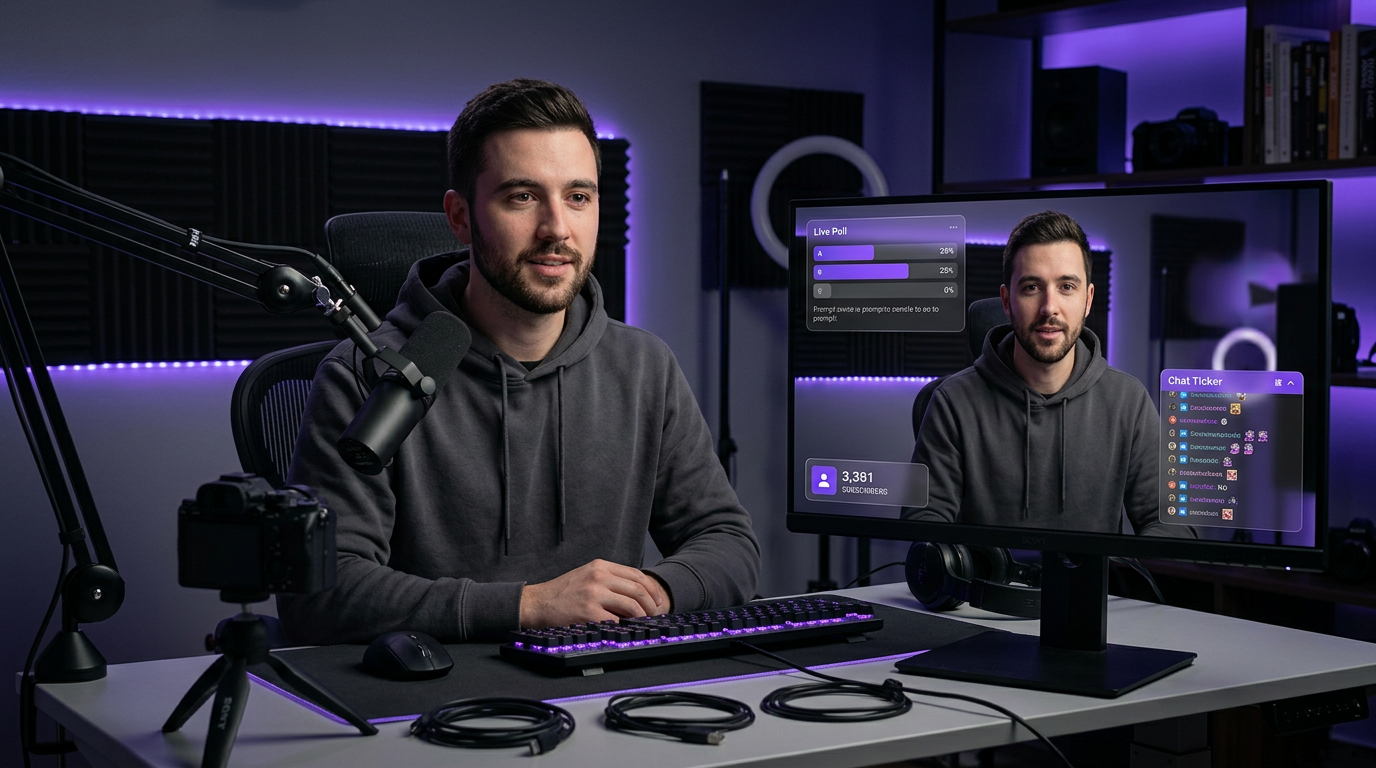
Consider a real-time poll result bar that updates as viewers vote via chat commands. Viewers who see their vote visually counted in the stream frame are demonstrably more likely to vote again on the next question, comment on the result, and share the stream clip. The overlay becomes a participation mechanism, not just a visual flourish.
Similarly, a live "Top Commenters" ticker — showing the usernames of the most active chat participants in a scrolling banner — rewards engagement in real time. This is the livestream equivalent of the deep reply weighting discussed in The 'Deep Reply' Weight (Threads/X): How Meaningful Comment Engagement Signals Channel Authority. When viewers see that participation has a visible, on-screen payoff, they participate more.
VSAT and Retention: What Your Overlay Does to Watch Time
VSAT — Viewer Satisfaction score, a composite metric YouTube calculates from watch time, likes, shares, and post-watch survey responses — is the north star metric for channel growth, as detailed in VSAT: The Only Metric That Matters for YouTube Channel Growth. On a livestream, VSAT is influenced heavily by concurrent viewer retention — how long the average viewer stays connected to the live session.
A well-designed AR overlay system directly supports retention by creating visual chapter markers. When you transition from a main topic discussion to a viewer Q&A segment, an overlay scene change — different background color, a new animated banner reading "Viewer Questions" — signals to the viewer that something new is starting. This resets their mental "exit timer." Instead of drifting away after twenty minutes of the same visual environment, they stay because the stream appears to be entering a new phase.
Technical Setup: A Practical Checklist for Solo Streamers
Before going live with AR overlays for the first time, run through this checklist:
1. GPU load test: AR overlays — especially animated or 3D ones — are GPU-intensive. Run your full OBS scene setup for thirty minutes before a live stream and monitor GPU temperature and frame drop rate using a tool like GPU-Z or MSI Afterburner. A dropped frame rate during a live stream cannot be recovered in post-production.
2. Scene switching shortcuts: Map every scene transition to a keyboard shortcut or a Stream Deck button. Fumbling for a mouse click mid-sentence breaks the conversational flow that keeps solo streams watchable. Physical hardware controllers like the Elgato Stream Deck cost under $100 and are the single highest-leverage purchase for solo streamers after a good microphone.
3. Alert testing: Fire every automated alert — subscriber notifications, donation alerts, raid alerts — in a private test stream before going public. Animated alerts that stutter, overlap, or play at incorrect volume destroy the professional impression your overlays were designed to create.
4. Mobile preview check: A significant portion of live viewers watch on mobile. Open your stream on a phone and verify that text in your overlay panels is legible at that screen size. Overlay text smaller than 18px at 1080p resolution typically becomes unreadable on a 6-inch phone screen.
Connecting Overlay Performance to Channel Strategy
AR overlays are not a standalone tactic. They work best when they reinforce a clear channel identity and content structure. If you have not yet defined the specific topic territory your channel owns, the foundation-level work is in Topic Clustering & Content Neighborhoods: How to Organize Your YouTube Channel for Algorithmic Authority. A well-designed overlay system reflects and reinforces that identity — your color palette, your recurring segment names, your branded terminology — on every stream.
Longform content, including livestreams, consistently outperforms shorter formats in raw engagement depth. Based on AskLibra data from 4 connected channels and 511 videos analyzed, longform content averages an engagement rate of 0.0226 — more than double that of short-form content. Livestreams, which are inherently longform, represent a significant engagement opportunity when paired with the visual retention tools that AR overlays provide.
For creators looking to track whether their overlay changes are actually moving retention metrics, Predictive Social Analytics: How to Use Data to See What Your YouTube Channel Needs Before It Happens covers how to set up monitoring before changes go live — so you are measuring outcomes, not guessing at them.
Frequently Asked Questions
Do AR overlays require expensive hardware to run?
Not necessarily. Browser-based overlays in OBS Studio run on most mid-range gaming PCs from 2019 onward without significant GPU load. True 3D face-tracked AR (like Touch Designer compositing) does require a dedicated GPU with at least 6GB VRAM, but simple animated graphic overlays are accessible to nearly any current streaming setup.
Will overlays slow down my stream or cause lag for viewers?
Overlays are rendered locally on your machine before encoding — they do not add to the data your viewers download. However, complex overlays increase the CPU and GPU load on your end, which can cause dropped frames in your encoded output if your hardware is near its limit. Always run a private test stream before going live with new overlay elements.
How many overlay elements is too many?
A practical ceiling is three to four simultaneous visual elements per scene: a background, a webcam frame or border, one data panel, and one alert zone. Any more than this and viewers begin to experience visual fatigue, which shortens session time. Minimalism is not a compromise — it is a performance decision.
Can I use AR overlays to display my YouTube analytics live on stream?
Yes. Tools like StreamElements and custom JavaScript browser sources can pull from the YouTube Data API to display live subscriber counts, live viewer totals, and concurrent chat volume inside your stream frame. This requires a YouTube API key and basic JSON configuration, but tutorials are widely available and setup typically takes under an hour.
Do AR overlays help with YouTube SEO after the stream ends?
Indirectly, yes. Overlays that improve viewer retention during a live stream increase the total watch time logged on your channel, which strengthens your channel's authority signals in YouTube's ranking systems. The VOD (video-on-demand) replay of your stream also benefits from strong retention data. For the full picture of how discovery and search work together, see Social SEO: Discovery vs. Search — How YouTube's Two Traffic Engines Actually Work.
Ready to see what the data says about your channel?
Stop guessing. Use AskLibra to get a personalized 90-day growth gameplan and find your perfect posting window.
No credit card required • Join 2,000+ creators